Daniel Im Projects Expired Lead Follow-Up Automation
CRM & Automation

Expired Lead Follow-Up Automation

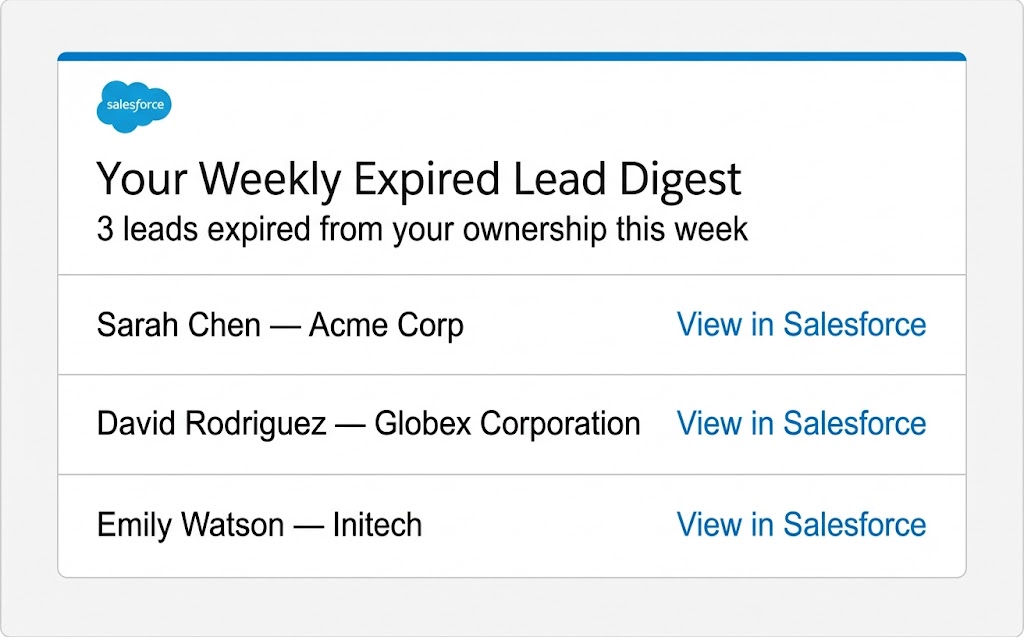
Turned a silent lead ownership loss point into an active re-engagement channel by building a fully native Salesforce system that emails each rep a weekly digest of their expired leads - complete with lead name, company, and a direct record link.

System Overview

When a rep claimed a lead, they had a 14-day ownership window to work it. If the lead expired before conversion, ownership moved back to a queue - silently. No notification, no record of what was lost, and no path to follow up. Leads just disappeared from rep names with no trace.

This project built a four-component native Salesforce system on top of the existing expiration Flow. It captures each expiration event at the moment it happens, stores it in a custom logging object, and delivers a personalized weekly email digest to every affected rep every Monday morning.

Structural Gap
  • No feedback loop existed when a lead expired out of a rep's name.
  • Flow cannot query Lead field history directly, so prior owner values were lost the moment ownership transferred.
  • Reps had no visibility into leads slipping out of their pipeline.
  • No automation existed to surface expiration events or enable re-engagement.
Architecture
  • Custom Logging Object - Created a custom Salesforce object to capture each expiration event: prior owner, lead name, company, and record ID. Required because Flow cannot query Lead history directly - the prior owner value had to be captured at the moment of expiration before it was overwritten.
  • Record-Triggered Flow (Immediate + Async) - Built on top of the existing expiration Flow with a split immediate/async path. The immediate path reads and stores the prior owner before the record updates. The async path handles bulk expirations without hitting Salesforce governor limits. Fault paths ensure a logging failure never blocks the core expiration process.
  • Scheduled Flow - Weekly Digest Email - Runs every Monday, queries the logging object for each rep's prior-week expirations, and emails a personalized digest with lead name, company, and a direct Salesforce record link for each expired lead.
  • Scheduled Flow - Log Cleanup - Runs on a trailing schedule to delete old log records and keep the custom object from accumulating unbounded data over time.
Lead Expiration Flow Trigger → Immediate path captures prior owner value → Async path writes log record (Lead name, Company, Prior Owner, Record ID) → Fault path: logging failure isolated from core expiration process Every Monday (Scheduled Flow) → Query log object for prior-week expirations by rep → Generate personalized digest email per rep → Email delivered with lead name, company, direct record link Trailing Cleanup (Scheduled Flow) → Delete log records older than retention window
Tools & Skills
  • Salesforce Flow Builder
  • Record-Triggered Flows (immediate + async split architecture)
  • Scheduled Flows
  • Custom Objects (expiration logging)
  • Salesforce governor limit handling
  • Built and tested in sandbox, then deployed to production
Scale
  • Primary users: all SDRs with active lead ownership
  • Digest frequency: weekly, every Monday
  • Trigger frequency: every lead expiration event
  • Architecture designed to handle bulk expiration events without governor limit failures
Operational Impact
  • Gave every rep a standing weekly feedback loop on expired leads.
  • Reps now use the digest to re-engage leads that previously disappeared with no trace.
  • Expiration events fully logged with prior owner, lead name, company, and direct record link.
  • Turned a silent ownership loss point into an active re-engagement channel with no manual effort required.